
Document Delete Skill
Cleaning Up Sensitive Data
Your Mattr AI Agents can handle lots of documents, especially sensitive ones like customer information. But once that data is processed and safely stored in its final home (like a long-term archive), you often need to remove the temporary copies from Uptiq.ai to meet privacy rules and keep your storage tidy.
That's exactly what the Document Delete Skill is for! It helps you automatically remove one or many documents from your Mattr storage in a single step.
Securely Deleting Customer PII After Archival
Imagine your workflow collects sensitive customer documents (like ID proofs or financial statements) for a loan application. After your AI Agent processes this information and securely archives the final version in your compliance system, you want to make sure the temporary copies within Mattr's conversation cache or working storage are completely removed. This protects customer privacy and helps you manage storage costs.
The Challenge:
Sensitive documents used during processing might remain in temporary storage within Mattr. Manually tracking and deleting these could lead to compliance risks and unnecessary storage fees.
The Solution:
By adding a Document Delete Skill at the end of your processing workflow (right after the document has been successfully archived externally), you can automate the secure cleanup of these temporary sensitive files.
Setting Up the Document Delete Skill
Let's walk through how to set up this Skill to automatically delete documents from your persistent Mattr storage after they've been securely archived.
Locate the Skill: Drag and drop the Document Delete Skill onto your Workflow Builder canvas, placing it after the node that confirms your document has been securely archived (e.g., an "Archive Document" custom Skill or an "API Call" Skill that pushes to your archive).
Configure "Items to Delete": This is where you tell the Skill which documents to remove.
Click on the Document Delete Skill to open its configuration panel.
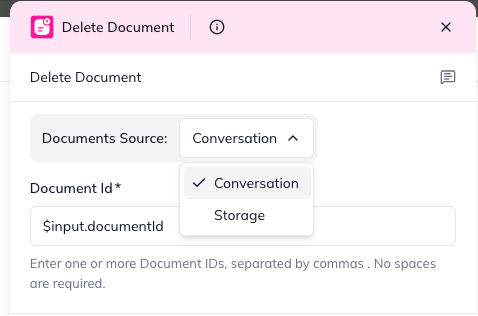
In the "Items to Delete" section, you'll specify the Document ID(s) of the files you want to remove.
Tip for Automation: You'll typically get these Document IDs from an earlier Skill's output (e.g., the Document Upload or Document Fetch Skill that brought them into Uptiq.ai). You can reference these using the $input syntax (e.g., $input.documentId if it's a single document, or $input.documents[0].documentId for the first document in a list).
You can list multiple Document IDs here if your workflow processed several files at once.
Specify the "Source": Tell the Skill where the documents are currently stored in Mattr.
Next to each Document ID you've added, choose its Source.
Conversation: Select this if the document was temporarily stored within the current workflow's conversation context.
Storage: Select this if the document was saved to your persistent Mattr storage.
If Source is Storage, optionally, you can also specify the Storage Path (e.g., loan-applications/temp/) if the document was stored in a specific subfolder within that storage ID.
Understanding the Outcome (Skill Output)
After the Document Delete Skill runs, it will tell your workflow how successful the deletion process was.
deletedCount: This number tells you exactly how many documents were successfully removed.
failedCount: This number shows how many deletion attempts didn't work.
items: This is a list that gives you a status update for each document you tried to delete. For example, it will show deleted: true if it was removed, or deleted: false along with an error message if there was a problem (like the document not being found or permissions issues).
statusCode: A number indicating the result of the delete attempt:
200: Success –File deleted successfully.
400: Bad Request – Failed: an error occured
500: Internal Server Error – Partial: Not applicable for single file deletion, but useful for other skills.
By integrating the Document Delete Skill, your workflows can not only process sensitive information efficiently but also ensure its secure and compliant removal once its purpose is fulfilled, keeping your data tidy and your operations secure!
Last updated