
Prompt Skill
Talking to AI Models
The Prompt Skill is your workflow's direct communication channel with powerful LLMs, like the ones that power advanced AI chatbots. It allows your workflow to send instructions, questions, and even documents to an AI model and receive its intelligent response. This is how you bring dynamic natural language generation and AI reasoning into your automated processes!
Summarizing Customer Feedback for Quick Insights
Imagine your workflow collects customer feedback from various sources (e.g., survey responses, support tickets). You want your AI Agent to automatically read through these texts and provide a concise summary, highlighting key themes or issues, so your team can quickly grasp the overall sentiment and take action.
The Challenge
Manually reading and summarizing large volumes of customer feedback is time-consuming and can be inconsistent.
The Solution
By using a Prompt Skill, you can send each piece of customer feedback to an LLM, asking it to identify the sentiment or provide a summary. Your workflow then receives these summaries, allowing for rapid analysis and decision-making.
Setting Up the Prompt Skill for Summarization
Let's walk through how to set up this Skill to summarize customer feedback.
Locate the Skill: Drag and drop the Prompt Skill onto your Workflow Builder canvas. Place it after the Skill that provides the customer feedback text (e.g., a "Data Extraction Node" from a survey response or an "API Call Skill" fetching ticket comments).
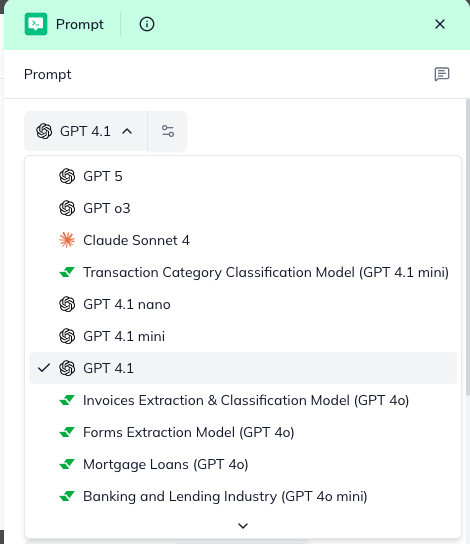
Configure "Model": First, select the LLM model that will perform the summarization.
Click on the Prompt Skill to open its configuration panel.
Choose a model from the "Model" dropdown list (e.g., Gemini-2.5-Flash, gpt-4). Uptiq.ai supports a continuously growing list of LLMs.
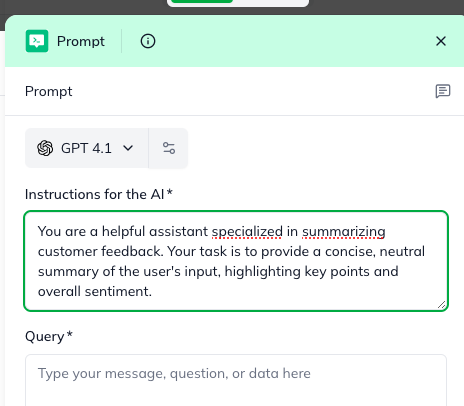
Define "Instruction to LLM": This field (formerly "System Prompt") sets the context and role for the LLM. It's like giving the AI its job description for this specific task.
In the "Instruction to LLM" field, type clear instructions for the AI: You are a helpful assistant specialized in summarizing customer feedback. Your task is to provide a concise, neutral summary of the user's input, highlighting key points and overall sentiment.
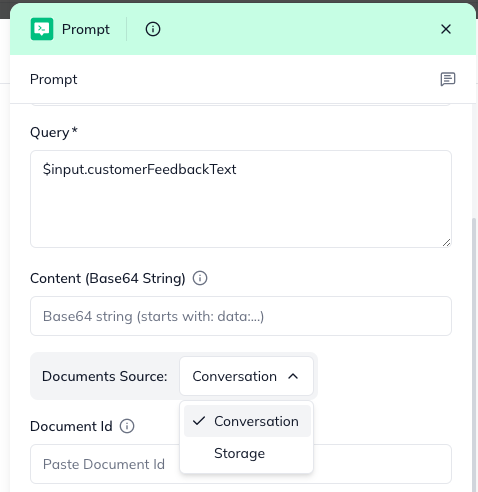
Set "User's Query": This is the actual customer feedback text that you want the LLM to summarize.
In the "User's Query" field, use the output from your previous Skill. For example, $input.customerFeedbackText (assuming customerFeedbackText is the field containing the feedback).
Optional: "Upload Document(s)": If the summary needs to consider additional context (e.g., a product manual or company policy related to the feedback), you can attach documents.
Select a document source:
Document ID(s): Provide IDs of documents collected earlier (comma-separated for multiple).
Base 64 Content: Provide the document's content directly as a Base-64 string.
Advanced Configurations (Typically for Developers): These settings offer fine-tuned control over the LLM's behavior. Business users usually don't need to change these, as the defaults are often suitable.
Temperature: Controls the creativity or "randomness" of the LLM's response.
Number of Conversation Turns: If this is part of a longer chat, this sets how many previous messages the LLM should remember (default is 3).
Response Format: By default, it's plain text. Developers might set this to JSON if they need structured output for later nodes.
Understanding the Outcome:
The Prompt Skill's output will contain the LLM's response to your query, which, in our use case, is the customer feedback summary.
content: This is the LLM's generated response (e.g., the summary of the customer feedback).
systemPrompt: This returns the Instruction to LLM that was sent with the request, useful for traceability.
error: A string with a descriptive error message. This will be null on success. This field is particularly useful if responseFormat was JSON and the LLM failed to produce valid JSON.
statusCode: A number indicating the result of the prompting attempt:
200: Success
400: Bad Request
500: Service-side failure
By using the Prompt Skill, your workflows can gain powerful AI capabilities like summarization, sentiment analysis, and dynamic content generation, making your business processes smarter and more efficient!