
Intent Classification Skill
Understanding User Goals
In a conversation with your AI Agent, customers often have a specific goal or question in mind. The Intent Classification Skill is your workflow's built-in "mind-reader"—it helps your Agent understand the user's underlying goal, or "intent," from a natural language query. This allows your workflow to take the right action, whether that's fetching data, starting a new process, or providing a specific answer.
Routing Customer Inquiries in a Financial Chatbot
Imagine your AI Agent powers a financial inquiry chatbot. When a customer types something like, "Can you please check my account balance?" or "I need to dispute a recent transaction," you need to quickly and accurately understand their intent to route them to the correct workflow.
The Challenge
Customers use different phrases to express the same goal. A simple keyword search might miss a query like "How much money is in my account?"
The Solution
By using an Intent Classification Skill, you can define a set of intents (e.g., CheckAccountBalance, DisputeTransaction) and provide examples of how a user might phrase them. The node then uses an LLM to match the user's query to the best-fitting intent, enabling your workflow to take the appropriate action.
Setting Up the Intent Classification Skill
Let's walk through how to set up this Skill to understand a customer's inquiry about their account balance.
Locate the Skill: Drag and drop the Intent Classification Skill onto your Workflow Builder canvas. Place it after the Skill that captures the user's query (e.g., an "Input Node" from a chat).
Configure "Model": First, choose the LLM model that will perform the classification.
Click on the Intent Classification Skill to open its configuration panel.
Select a model from the "Model ID" dropdown list (e.g., gpt-4o).
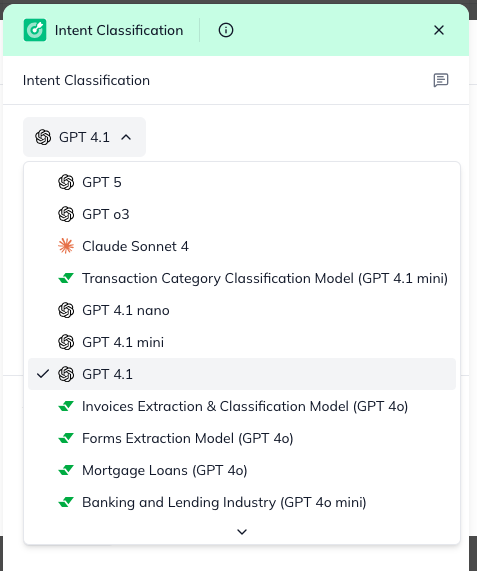
Define Your "Intents": This is the most important part! You'll define the different goals your workflow can handle.
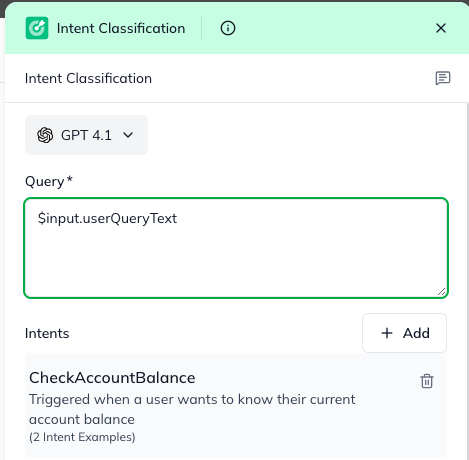
In the "Intents" section, add a new intent. For our use case, we'll create the intent to check a balance:
Name: Give it a clear name, like CheckAccountBalance.
Description: Write a brief description of what this intent means (e.g., "Triggered when a user wants to know their current account balance.").
Examples: Provide several example phrases a user might say, separated by commas (e.g., What's my balance?, How much money is in my account?, Show me my current funds.). These examples help the LLM learn to recognize the intent.
You would repeat this process for any other intents your workflow should handle (e.g., DisputeTransaction, ApplyForLoan).
Set the "Query": This is the actual user text you want to classify.
In the "Query" field, use the output from your previous Skill that provides the user's message (e.g., $input.userQueryText).
Understanding the Outcome
After the Intent Classification Skill runs, it passes on the classified information to the next steps in your workflow.
intentMatched: A simple true or false value indicating whether a suitable intent was found.
intents: This is a list of potential matches. The first item in the list will be the best match.
For example, if the user said "I want to fly to Paris," the output might be intent: BookFlight. You can then use a Conditional Logic Skill to check for this intent and route the workflow accordingly.
query: The original user query that was analyzed.
By using the Intent Classification Skill, your AI Agents can intelligently understand user needs and take the correct automated actions, leading to a much more intuitive and responsive user experience!