
Document To Image Node
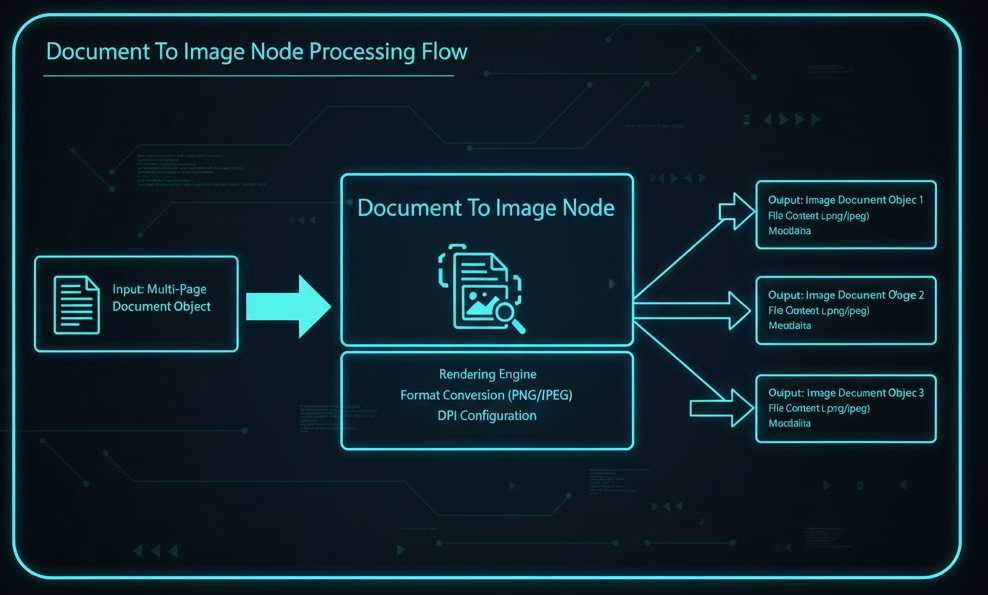
Converts an existing document (PDF, DOCX, XLSX) into one or more raster images (PNG by default) for image-based processing or preview rendering.
How It Works
Input Resolution: Uses $input (previous node output), $agent (agent-level vars), and $secret (vault secrets).
Request / Processing:
Pulls the source file from internal storage using documentId.
Streams pages/sheets to the rendering engine, respecting pageLimit.
Encodes each page/sheet as an image and writes it to outputStorage.
Generates lightweight metadata (page number, sheet name) for each rendered image.
Execution Model: Blocking – typically completes in a single invocation for ≤50 pages. Large files may be delegated to an async worker but appear blocking.
Response Handling:
Success: Returns an imagesResult array with one entry per page/sheet.
Partial: If some pages fail, status is "partial" and errorMessage explains.
Failure: On unrecoverable errors (e.g., unsupported format), throws a workflow-catchable exception.
Configuration Schema
Field
Type
Required
Description
documentId
string
✅
ID of the document to convert.
source
string
✅
Conversation if it's a temporary file, or Storage if it's from persistent storage.
sourceStoragePath
string
Optional
If Source is Storage, add its StoragePath.
pageLimit
number
Optional
Maximum number of pages to convert (starting from page 1).
outputStorage
string
Optional
'conversation' (default) or 'storage' – where images will be stored.
outputstoragePath
string
Optional.
Can be provided when outputStorage='storage'.
name
string
Optional
Optional display name for this node instance.
description
string
Optional
Longer description shown in workflow designer.
Output Schema
statusCode
number
✅
Overall result: "success", "partial", "error". HTTP-like status code (200 for success, 400/500 for error).
error
string | null
No
Populated when statusCode is > 200.
imagesResult
Array
✅
One entry per converted page/sheet.
Each Entry in imagesResult Array
images
Array
Each rendered image ({ documentId: string }).
sheetName
string
No
pageNumber
number
No
Error Handling
DocumentNotFoundError: Invalid or inaccessible documentId.
Unsupported FormatError: File type not convertible.
RenderTimeoutError: Exceeded platform time-box for large files.
Each error surfaces with status = "error" and a descriptive errorMessage.
Single-Node Test API
For testing a node in isolation (e.g., via the UI "Test" button or a dedicated API), the following endpoint is used:
Path: /skill-runtime/workflows/nodes/DocumentToImage/execute
Method: POST
Purpose: Execute one node in isolation.
Request Body :
{
"nodeType": "DOCUMENT_TO_IMG",
"config": { /* refer to configuration schema */ },
"input": { /* becomes $input */ }
}
Security Notes
No external endpoints are called; all processing is contained within the platform's secure VPC.
$secret not required, but downstream nodes must avoid logging raw image data or IDs marked as sensitive.
When outputStorage='storage', ensure the calling workflow has write permission to the specified storagePath.
Last updated