
Pass Through Skill
Organizing Your Workflows
Sometimes, when you're building complex workflows, you'll create many different paths or "branches" to handle various situations. But eventually, you'll want all those paths to come back together into a single, common flow. That's where the Pass Through Skill comes in!
The Pass Through Skill is a simple, yet powerful, tool for organizing your workflows. It doesn't do any processing or transformation itself; it just acts as a placeholder or a merging point, taking whatever information flows into it and passing it directly out. This helps keep your workflows clear, manageable, and easy to understand.
Merging Different Loan Product Flows
Imagine your workflow guides a user through selecting a loan product. Based on their choice, the workflow branches into different sets of questions (e.g., one path for "Personal Loan," another for "Home Loan," another for "Auto Loan"). Each of these paths collects specific information needed for that loan type. Once all the necessary information is gathered, you want to merge these different paths back into a single flow to proceed with the next stage, such as curating suitable products for the user.
The Challenge
After collecting different sets of information through various branches, you need a single, clear point where all that collected data can converge before moving to the next common step in the workflow.
The Solution
By using a Pass Through Skill, you can create a clean merging point. All the data from the different loan product branches will flow into this skill, and then it will seamlessly pass all that combined information to the next stage of your workflow.
Setting Up the Pass Through Skill
Let's walk through how to set up this Skill to merge different loan product information flows.
Locate the Skill: Drag and drop the Pass Through Skill onto your Workflow Builder canvas. Place it at the point where you want to merge multiple incoming branches into a single outgoing path.
Configure the Skill: The Pass Through Skill is very simple to configure because it doesn't perform any processing.
Click on the Pass Through Skill to open its configuration panel.
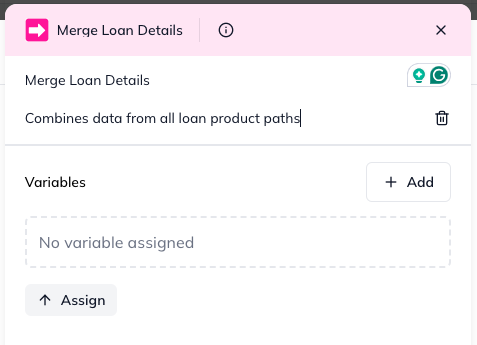
You can optionally give it a Name (e.g., "Merge Loan Details") and a Description (e.g., "Combines data from all loan product paths") to improve workflow clarity. There are no other fields to fill in.
Understanding the Outcome (Skill Output)
After the Pass Through Skill runs, it simply passes on all the information it received from its incoming branches to the next node in the workflow.
data: This will contain all the unmodified input that flowed into the Pass Through Skill. If multiple branches fed data into it, this output will be the combined data from all those branches.
statusCode: This will almost always be 200 (Success), as the Skill doesn't perform complex operations that typically fail.
error: This will be null on success.
By using the Pass Through Skill, you can create well-structured, easy-to-follow workflows, even when dealing with complex branching logic, ensuring all necessary information is collected and propagated to the next common stage!